Equipment register
List equipment names, categories, quantity owned and day/week rates. See current quantity on hire and current quantity available, calculated from rows marked On Hire.
Free Excel template
A practical starting point for independent UK tool and light-plant hire businesses. Keep equipment, customers and hires organised in one straightforward workbook.
Starting with a small hire fleet? Use this equipment rental spreadsheet to record what you own, what is out on hire and when it is due back.
One workbook, the everyday basics
A simple equipment hire inventory template for keeping your records together, without building your own sheet from scratch.
List equipment names, categories, quantity owned and day/week rates. See current quantity on hire and current quantity available, calculated from rows marked On Hire.
Keep customer IDs, names, business names, contact details and notes in one simple list, ready to reference when recording a hire.
Record the customer, equipment, quantity, out/due/returned dates and booking status. The basic hire-value estimate uses quantity, inclusive hire days and the daily rate.
See equipment totals, units on hire, available stock, open hires, overdue hires and estimated hire value. A Start Here tab explains how the workbook fits together.
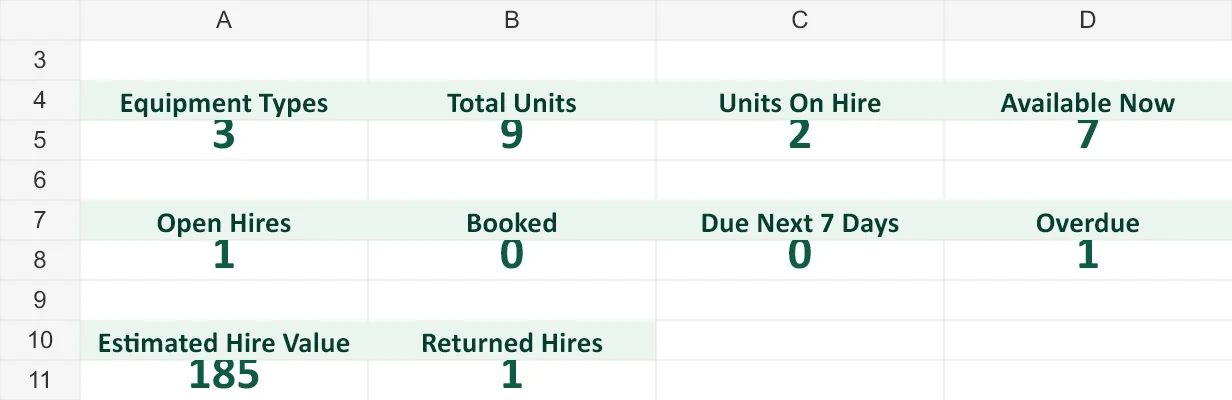
Download a copy, open it in Excel and start with the Start Here tab.
The hire-value figure is a basic daily-rate estimate only. Weekly pricing, discounts, VAT and delivery need separate manual calculations; it is not an invoice.
Also running hires on paper? Download our free equipment hire agreement template.
A spreadsheet can be a useful starter while you can comfortably check each booking yourself. This template deliberately keeps things simple:
If those checks become harder as your hire activity grows, dedicated software is a natural next step.
Keep the workflow together
DepotEase is simple hire software for independent UK tool and light-plant businesses. Keep equipment availability, customers and hires together, from booking and hand-out through partial or damaged returns, return photos and invoices/PDFs.
Give staff access to day-to-day hire work, with billing and subscription controls kept Owner-only.
£49/month · One depot · Up to 3 users
Start Free Trial14-day free trial · No card required. £49/month if you choose to subscribe.
Yes. Download the workbook directly, with no email address, account or DepotEase subscription required. The optional DepotEase trial is separate from the free template.
It is a standard .xlsx workbook with no macros, designed for Microsoft Excel. Open it in Excel and allow its formulas to calculate. Other spreadsheet applications may display formatting or formulas differently.
Yes. It suits a simple quantity-based tool register, such as breakers, mixers and compactors, with customer and hire records alongside it. Replace the example rows with your own equipment and customers.
Yes, for a basic light-plant hire inventory and booking record. It is not a maintenance, inspection or compliance system, and it does not manage complex plant operations.
No. It estimates availability now from hires marked On Hire; it does not calculate true future-date availability or block conflicting bookings. Check dates and quantities yourself before confirming each hire.
When checking overlapping bookings, tracking partial or damaged returns, sharing staff access or producing invoices becomes difficult to manage manually. DepotEase brings those day-to-day hire tasks into one system.
No account needed. Download it and make it your own.